



Steps to Help You Ride
Plan Your Trip
Before you travel, use one of the trip planning resources available to find the best route for your trip and where to get on and off. Plan to arrive before your bus is scheduled, as buses sometimes run a few minutes early. See below for commonly used apps.
Find Your Bus or Train
Identify your bus or train by checking the route numbers along the top and side of the vehicle. Signs on the street or in transit stations will list which routes are served by the stop you are using. Timetables are available at most stops to show you the estimated arrival times for different stops along the route. See below for examples.
Enter and Pay Your Fare
Upon entering the bus or train, you will be required to pay the fare for the trip. To pay the fare on the bus, tap an ORCA card, insert a bus ticket (tickets can be purchased at a ticket vending machine) into the on-board fare box, or insert an exact amount of cash or coins into the fare box to cover the fare. Remember, drivers cannot give change.
To pay the fare on the train, tap an ORCA card on the station platform fare payment readers before boarding the train. Fare Ambassadors will periodically check fare payment on platforms and trains. You can also use the Transit GO Ticket app to purchase a ticket and show the driver. See below for more information.
Request Your Stop
(Bus only) Upcoming stops are usually displayed on the reader board inside the bus or train, near the exits. Stops will often be announced inside the bus as well. When your stop is next, pull the yellow cable near the window or push the red “stop” button on the edge of some seats or near the rear door handrail. This lets the driver know you want to get off.
Transit etiquette
At the stop or platform:
- Let riders exit before boarding.
- Spread out along the platform or at the bus stop.
- Do not hold the doors.
On board the bus or train:
- Have your fare ready to speed up boarding for everyone.
- Leave the seats at the front open for families, older adults and persons with mobility assistance devices.
- Unless you need the handicap ramp, exit to the rear of the bus when feasible.
- Remove your backpack on crowded buses or trains.
- Hold your purse, backpack and other personal items on your lap, at your feet or in the overhead luggage areas if available. No eating, smoking or littering; carry food and drinks in closed containers.
- Wear headphones and listen at a low volume.
- It is polite not to talk on the phone while you ride the bus, but if you must, try to keep it respectful, quick and quiet.
- Move aside and let other riders exit the train or bus.
Plan Your Trip
Google Maps also provides a handy tool to help you plan your trip using transit. To use this feature visit Maps.Google.com or download the free app. Enter your LOCATION and a DESTINATION, Select the TRANSIT icon (looks like a bus or train) and Google Maps will provide a list of transit stops closest to your location, walking times, route numbers and schedule information. Select the route that works best for you.
OneBusAway is tool that enables transit agencies to provide real-time vehicle locations, alerts, and arrival information to riders. OneBus Away for Puget Sound is maintained and supported by Sound Transit for riders in the Puget Sound region. To use OneBus Away, download and open the mobile app. The tool gives you the option to search by street address, bus route or bus stop code. Based on your search information, the tool will provide available stops, pick-up times and route numbers.

To use the King County Metro Trip Planner simply visit the website, enter your ORIGIN (where you are leaving from), enter your DESTINATION (where you want to go), and when you want to LEAVE or ARRIVE. The tool will generate a list of itineraries to choose from that best meet your travel needs. Each option provides walking distances to designated bus stops, addresses for the stops, and the bus route numbers to take. It also provides the fare amount and estimated travel times to help you plan your trip.

Sound RideGuide is a new mobile app offered by Sound Transit. The app provides a multi-modal trip planner, real-time updates, fare information and service alerts.
Pay Your Fare
Cash

Cash is accepted on buses; however, the driver cannot give any change! Have the exact fare ready (you can overpay if you don’t have the exact amount). If you are using different transit systems, you will have to pay for each bus you ride.
• Transfers are valid only on King County Metro buses. Ask the driver for a paper transfer at the time you pay. Transfers are valid only on Metro buses.
• For Link light rail or Sounder trains, a one-way or all-day round-trip ticket can be purchased with cash (or credit/debit card) at ticket machines located at all stops.

The Transit GO Ticket app is a safe, contactless way to plan your trip and pay transit fares on the go using your mobile phone. Simply download and open the app, create your profile, and set up your payment method using a debit or credit card, and you’re ready to start planning and purchasing transit tickets.
ORCA Card

The ORCA card is the preferred payment method when using transit in the Puget Sound region. Adult, Senior, and Youth card options are available, as well as reduced fare options for qualifying riders with low incomes and disabilities.
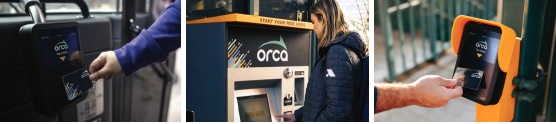
• Order and preload cards online at myorca.com/buy-online, OR;
• Download the myORCA app for free on iPhone and Android to manage your account (You’ll need an ORCA card to use the myORCA app).
Download at the Apple App Store
Download at the Google Play App Store
• Purchase/reload cards at participating retailers, vending machines, and other customer service offices. To find a purchasing location go to: myorca.com/where-to-buy.
• ORCA offers flexible programs for businesses, schools and organizations can be found at: myorca.com/business. Organizations can also offer savings like transportation tax deductions and more to attract and retain employees by providing options for sustainable travel.
How To Ride Transit
Now that you’ve learned how to plan your trip and purchase your fare, you’re ready to hop on board. Here are some helpful tips to help make your trip effortless and enjoyable.
How to Ride a Bus
.png)
1)Check for the street sign indicating the route number to make sure you wait on the correct side of the street.
2)An ORCA card reader is located just inside the front door of the bus to your right.
3)The reader board at the top front of the bus displays route numbers and destination.
4)To request a stop, pull the yellow cord inside the bus that runs down each side.
How to Ride a Train
.png)
1) Check the overhead sign at each station to make sure you are on the correct side of the platform.
2) An ORCA Card reader is located on the station. Use it to scan your card before you board.
3) The reader board at the top front of the train displays the final destination of the line.
4) To help you identify your stop, refer to the line diagram located inside the train above the windows.
Apps and Technology

You’re already viewing the Choose Your Way Bellevue website, which convenes tools and information to help you get around Bellevue sustainably. The platform now has a mobile app that puts this content at your fingertips-use the app to learn about and plan your travel, log your trips and earn rewards!

FindARide.org is an online resource for transportation services in the central Puget Sound region. Transportation options include public transit, special needs transportation, and community shuttles. FindARide.org was envisioned as a gateway to transportation options in the Puget Sound area. The site was created and managed by Sound Transit until 2015 and is now a service of Hopelink.

Citymapper provides real-time transportation arrival times, trip planning, and maps to help you compare modal options for getting from A to B by transit, foot, bicycle, or ride hailing. It even includes times to get to and use the closed available dockless bike share bike. It can save trip information for quick reference and has a “meet me” feature to make sharing directions easy. The app also tracks calories burned, trees preserved, and money saved.
Desktop version also available.
Transit provides trip planning with easily comparable route options and real-time bus location information. The app includes information on ride hailing (such as Uber and Lyft), carshare (Car2Go, available in Seattle) and bike share options, in addition to local transit agencies. Transit also provides step-by-step navigation, including alerts to pick up the pace if you're in danger of missing your bus!
Accessibility
Riding transit is a great option for people with special needs.
- Seniors, people with disabilities and those on Medicare are eligible for Regional Reduced Fare Permits.
- ORCA provides a discounted daily per-ride rate for riders with disabilities.
- All public transit buses are outfitted with wheelchair ramps and compliant with the Americans with Disabilities Act.
- The Trip Planner (for transit trips) allows you to specify how far you’d like to walk and filter routes based on accessibility.
- Free transportation training is available to people with disabilities who are 14 years or older or seniors who are 65 years or older to support independent transit trips on Metro and Sound Transit.
- Service animals and personal care assistants ride with you for free on Sound Transit and King County Metro.
- Access Transportation is a paratransit service that takes you anywhere a Metro bus, Seattle streetcar, or Sound Transit light rail goes at the time it is scheduled.
- The Transportation Resources Line (a service of Hopelink Mobility Management) can provide you with one-on-one support in finding unique transportation options that fit your needs. The Mobility line is open from 9 a.m. to 4 p.m. Monday through Friday. If you leave a voicemail, Hopelink will return your call within two business days. To learn more, please email mobility@hopelink.org; call 425-943-6760; or complete Hopelink's online form.
- The Hyde Shuttle program provides door-to-door van service for older adults and adults with disabilities throughout many communities in King County.
- FindARide, a service of Hopelink, helps people with special mobility needs get around King County. Type information about your origin and destination, together with your accessibility needs, and the tool will display a list of transportation services.
- King County Metro Neighborhood Pop-up brings Metro information, ORCA card services and more to customers throughout King County.
Learn more by viewing the accessibility pages for King County Metro and Sound Transit, as well as the King County Mobility Coalition web page.